Nothing leaves your device
Processing runs in a background worker inside this tab. There is no upload step and no server that could keep a copy.
0 bytes uploadedWorks offline after loadNo account
Clean Gemini images and Veo videos right in your browser. Pixel-accurate, free, and nothing is uploaded.
Files never leave this device.
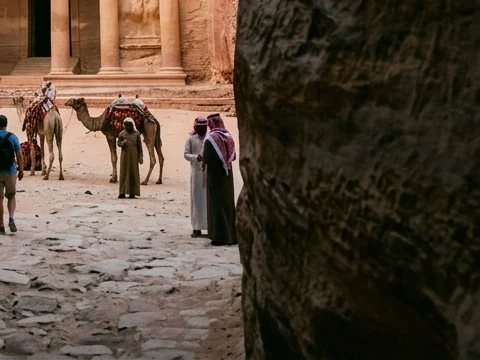
This is a real Gemini image, cleaned by the same code that runs in the tool above. The stone texture under the logo is recovered from the pixels themselves, not painted over.
Processing runs in a background worker inside this tab. There is no upload step and no server that could keep a copy.
Square, portrait, cinematic and 8:1 panoramas, from 1K to 4K. The mark is located, not assumed.
Clean a whole batch at once. Videos keep their original audio track.
Only the pixels under the logo change. A PNG stays a lossless PNG, and every other pixel in the file is left exactly as Gemini made it.
Gemini blends a semi-transparent white logo into the corner using a known transparency map. Because the blend is a simple equation, it can be run backwards to get the exact original pixel.
Yes. There is no account, no watermark of our own, and no daily limit. Your device does the work, so there is nothing for us to meter.
No. Files are read and processed inside your browser tab, and the cleaned result is created on your device. You can turn off your internet after the page loads and it still works.
Original downloads of Gemini images in any aspect ratio, from 1:1 to 21:9 and extreme panoramas, and Veo videos exported from Gemini, whether they carry the sparkle or the newer "Veo" wordmark. Screenshots, crops and resized copies move or blur the mark, so they may not be detected.
No. Gemini also embeds SynthID, an invisible watermark that marks a file as AI-generated. Unsparkle removes only the visible logo. SynthID stays in the file and can still be detected.
Only the pixels under the logo are recalculated. PNG images stay lossless, JPEG and WebP are saved at 95% quality, and videos are re-encoded at a high bitrate with the original audio copied over untouched.
The file was probably edited after Gemini created it: cropped, resized, screenshotted or compressed by a chat app. Download the original from Gemini and try again. Files without a mark are left unchanged.
Please only process images and videos you created or have the rights to, and follow the rules of the platforms where you publish them, including any AI-disclosure requirements.